Saturday, July 13, 2013

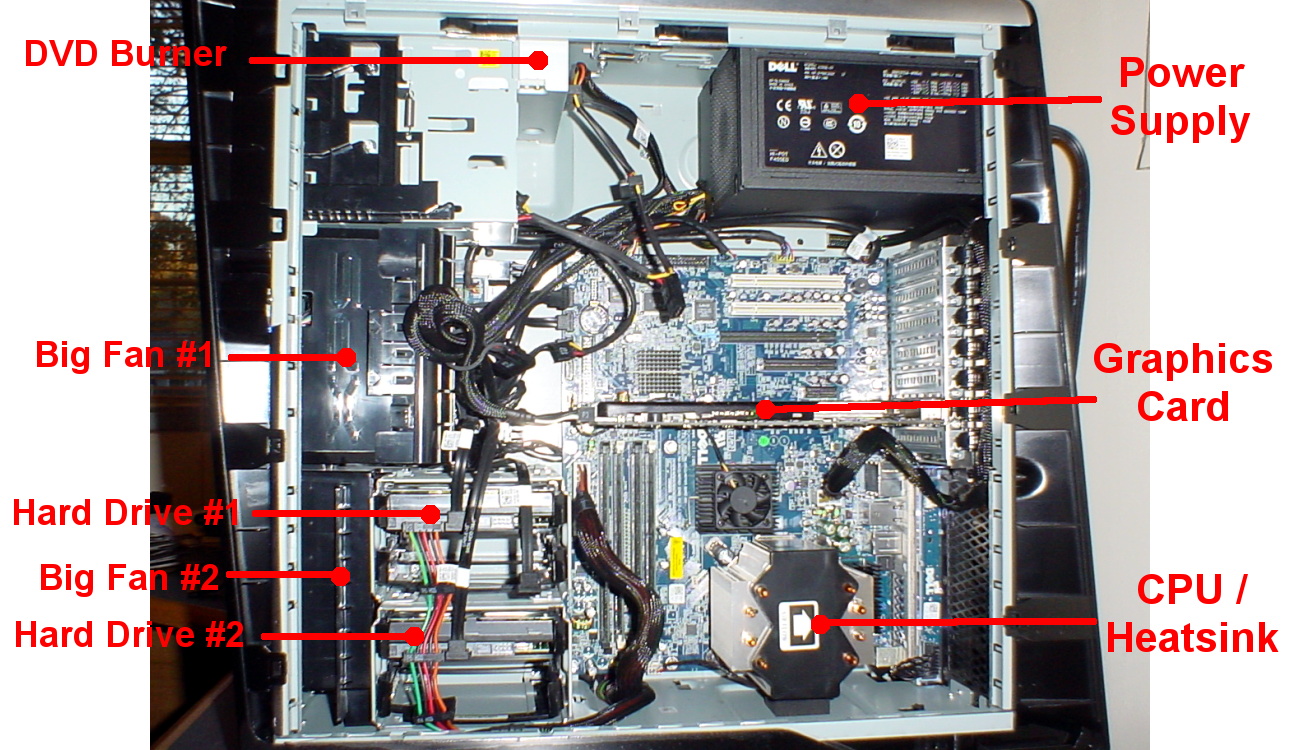
A Look Inside a Desktop Computer

CPU/Processor


The Central Processing Unit (CPU), also called a processor, is located inside the computer case on the motherboard. It is sometimes called the brain of the computer, and its job is to carry out commands. Whenever you press a key, click the mouse, or start an application, you're sending instructions to the CPU.

The CPU is generally a 2-inch ceramic square with a silicon chip located inside. The chip is usually about the size of a thumbnail. The CPU fits into the motherboard's CPU socket, which is covered by the heat sink, an object that absorbs heat from the CPU.

A processor's speed is measured in megahertz (MHz), or millions of instructions per second, and gigahertz (GHz), or billions of instructions per second. A faster processor can execute instructions more quickly. However, the actual speed of the computer depends on the speed of many different components - not just the processor.

There are many processor manufacturers for personal computers, but the most well-known ones are Intel and AMD.


Motherboard


The motherboard is the computer's main circuit board. It's a thin plate that holds the CPU, memory, connectors for the hard drive and optical drives, expansion cards to control the video and audio, as well as connections to your computer's ports (such as the USB ports). The motherboard connects directly or indirectly to every part of the computer.


Power Supply Unit


The power supply unit in a computer converts the power from the wall outlet to the type of power needed by the computer. It sends power through the cables to the motherboard and other components.

If you decide to open the computer case and take a look, make sure to unplug the computer first. Before touching the inside of the computer, you should touch a grounded metal object (or a metal part of the computer casing) to discharge any static buildup. Static electricity can be transmitted through the computer circuits and ruin them.


RAM (Random Access Memory)


RAM is your system's short-term memory. Whenever your computer performs calculations, it temporarily stores the data in the RAM until it is needed.

This short-term memory disappears when the computer is turned off. If you're working on a document, spreadsheet, or other type of file, you'll need to save it to avoid losing it. When you save a file, the data is written to the hard drive, which acts as long-term storage.

RAM is measured in megabytes (MB) or gigabytes (GB). The more RAM you have, the more things your computer can do at the same time. If you don't have enough RAM, you may notice that your computer is sluggish when you have several programs open. Because of this, many people add extra RAM to their computers to improve performance.

A bit is the smallest unit of data in computer processing. A byte is a group of eight bits. A megabyte contains about one million bytes, and a gigabyte is about one billion bytes.

Hard Drive


The hard drive is the data center of the computer. This is where the software is installed, and it's also where your documents and other files are stored. The hard drive is long-term storage, which means the data is still saved even if you turn the computer off or unplug it.

When you run a program or open a file, the computer copies some of the data from the hard drive onto the RAM so that it can access the data more easily. When you save a file, the data is copied back to the hard drive. The faster the hard drive is, the faster your computer can start up and load programs.

Most hard drives are hard disk drives, which store data on a magnetic platter. Some computers now use solid-state drives (also called flash hard drives). These are faster and more durable than hard disk drives, but they are also more expensive.

A USB flash drive is basically a small, removable flash hard drive that plugs into a USB port. These are a convenient way to bring your files with you and open them on a different computer.

If you're using Windows, you can view information about your computer's RAM and processor speed without opening up your computer. Just go to the Control Panel (in the Start menu) and click System and Security. In Mac OS X, you can view this information by clicking the Apple icon and selecting About This Mac.


Expansion Cards

Most computers have expansion slots on the motherboard that allow you to add various types of expansion cards. These are sometimes called PCI (Peripheral Component Interconnect) cards. You may never have to add any PCI cards, as most motherboards have built-in video, sound, network, and other capabilities. However, if you want to boost the performance of your computer or update the capabilities of an older computer, you can always add one or more cards. Below are some of the most common types of expansion cards:

Video card

The video card is responsible for what you see on the monitor. Most computers have a GPU (Graphics Processing Unit) built into the motherboard, instead of having a separate video card. If you like playing graphics-intense games on the computer, you can add a faster video card to one of the expansion slots to get better performance.


Sound Card


The sound card, also called an audio card, is responsible for what you hear in the speakers or headphones. Most motherboards have integrated sound, but you can upgrade to a dedicated sound card for higher quality sound.


Network Card

The network card allows your computer to communicate over a network and access the internet. It can either connect with an Ethernet cable or through a wireless connection (often called Wi-Fi). Many motherboards have built-in network connections, and a network card can also be added to an expansion slot.


Bluetooth Card


Bluetooth is a technology for wireless communication over short distances. It's often used in computers to communicate with wireless keyboards, mice, and printers. It's often built into the motherboard or included in a wireless network card. For computers that don't have Bluetooth, a USB adapter (called a dongle) can be purchased.


Source ; inside


It is true that the "G" terms are commonly used in advertisements. The “G” is often used in commercials as a way to entice the audience. The “G” actually stands for generation. Therefore, “4G” stands for fourth generation. This means that there are different generations of phones.


First Generation (1G) Phones


The preliminary first generations phones were released during the 1980s. These phones were much larger than the ones that are in the market today, and they had a broad rigid structure. The Motorola DynaTAC was one of the prominent models of first generation phones. These phones primarily used radio transmissions (AM and FM), unlike the phones that use digital technology today. For more examples, watch any old movie from the 1980's with a wealthy business man in it. He or she will probably have one.


Second Generation (2G) Phones


The first second generation phones were released in Finland in 1991. Unlike first generation phones, which mainly used radio transmissions, second generation phones used digital technology. Eventually, second generation phones came with text messaging and Internet access. However, the Internet connection was very slow. They were similar to dial-up connections because the users could not receive or make calls when surfing the Internet. These were really the first mainstream mobile phones. They marked the point where they started to become affordable for the general public to buy.


Third Generation (3G) Phones


Japan released the first 3G networks in 2001. 3G network mobile phones were able to browse the Web at higher speeds. In addition, users could also receive and make phone calls while browsing the Internet. When the iPhone 3G was released, the browsing experience improved substantially. This paved the way for 4G networks.


Fourth Generation (4G) Phones


As the demand for faster speeds and better browsing experienced increased, 4G were introduced into the market. 4G networks allow mobile phones to connect even faster to the Internet—reaching speeds 6 megabits per second—faster than some broadband connections. Phones in this category are quite powerful, and are more of a handheld computer that makes phone calls, than a phone.


Once we reached the Third Generation of phones, the line started to get blurred, especially here in Australia. Telstra keeps going on about its 3G network and the phones that use it. Even so the 4G phones are out there, mostly running on the 3G network. But with phones having reached this level, its less important than it used to be. The only exception is in remote areas where choosing between the "3G" and "NextG" networks can make the difference between good reception and no recption at all but these places are slowly getting fewer and further between.


source :Mobile

Mobile phone


An electronic telecommunications device, often referred to as a cellular phone or cellphone. Mobile phones connect to a wireless communications network through radio wave or satellite transmissions. Most mobile phones provide voice communications, Short Message Service (SMS), Multimedia Message Service (MMS),  and newer phones may also provide Internet services such as Web browsing and e-mail.

Source : Mobile

The Five Generations of Computers

The history of computer development is often referred to in reference to the different generations of computing devices. Each of the five generations of computers is characterized by a major technological development that fundamentally changed the way computers operate.
The history of computer development is often referred to in reference to the different generations of computing devices. Each of the five generations of computers is characterized by a major technological development that fundamentally changed the way computers operate, resulting in increasingly smaller, cheaper, more powerful and more efficient and reliable computing devices.
In this Webopedia reference article you'll learn about each of the five generations of computers and the technology developments that have led to the current devices that we use today. Our journey starts in 1940 with vacuum tube circuitry and goes to the present day -- and beyond --  with artificial intelligence.
Related Webopedia Definitions: computer, magnetic drums, binary, integrated circuit,  semiconductor, nanotechnology

First Generation (1940-1956) Vacuum Tubes

The first computers used vacuum tubes for circuitry and magnetic drums for memory, and were often enormous, taking up entire rooms. They were very expensive to operate and in addition to using a great deal of electricity, generated a lot of heat, which was often the cause of malfunctions.
First generation computers relied on machine language, the lowest-level programming language understood by computers, to perform operations, and they could only solve one problem at a time. Input was based on punched cards and paper tape, and output was displayed on printouts.
The UNIVAC and ENIAC computers are examples of first-generation computing devices. The UNIVAC was the first commercial computer delivered to a business client, the U.S. Census Bureau in 1951.

A UNIVAC computer at the Census Bureau.
Image Source: United States Census Bureau

Second Generation (1956-1963) Transistors

Transistors replaced vacuum tubes and ushered in the second generation of computers. The transistor was invented in 1947 but did not see widespread use in computers until the late 1950s. The transistor was far superior to the vacuum tube, allowing computers to become smaller, faster, cheaper, more energy-efficient and more reliable than their first-generation predecessors. Though the transistor still generated a great deal of heat that subjected the computer to damage, it was a vast improvement over the vacuum tube. Second-generation computers still relied on punched cards for input and printouts for output.
Second-generation computers moved from cryptic binary machine language to symbolic, or assembly, languages, which allowed programmers to specify instructions in words. High-level programming languages were also being developed at this time, such as early versions of COBOL and FORTRAN. These were also the first computers that stored their instructions in their memory, which moved from a magnetic drum to magnetic core technology.
The first computers of this generation were developed for the atomic energy industry.

Third Generation (1964-1971) Integrated Circuits

The development of the integrated circuit was the hallmark of the third generation of computers. Transistors were miniaturized and placed on silicon chips, called semiconductors, which drastically increased the speed and efficiency of computers.
Instead of punched cards and printouts, users interacted with third generation computers through keyboards and monitorsand interfaced with an operating system, which allowed the device to run many different applications at one time with a central program that monitored the memory. Computers for the first time became accessible to a mass audience because they were smaller and cheaper than their predecessors.

Fourth Generation (1971-Present) Microprocessors

The microprocessor brought the fourth generation of computers, as thousands of integrated circuits were built onto a single silicon chip. What in the first generation filled an entire room could now fit in the palm of the hand. The Intel 4004 chip, developed in 1971, located all the components of the computer—from the central processing unit and memory to input/output controls—on a single chip.
In 1981 IBM introduced its first computer for the home user, and in 1984 Apple introduced the Macintosh. Microprocessors also moved out of the realm of desktop computers and into many areas of life as more and more everyday products began to use microprocessors.
As these small computers became more powerful, they could be linked together to form networks, which eventually led to the development of the Internet. Fourth generation computers also saw the development of GUIs, the mouse and handhelddevices.

Fifth Generation (Present and Beyond) Artificial Intelligence

Fifth generation computing devices, based on artificial intelligence, are still in development, though there are some applications, such as voice recognition, that are being used today. The use of parallel processing and superconductors is helping to make artificial intelligence a reality. Quantum computation and molecular and nanotechnology will radically change the face of computers in years to come. The goal of fifth-generation computing is to develop devices that respond to natural language input and are capable of learning and self-organization.


source :Genaration

What is a Computer


A computer is a programmable machine. The two principal characteristics of a computer are: it responds to a specific set of instructions in a well-defined manner and it can execute a prerecorded list of instructions (a program).

Modern Computers Defined

Modern computers are electronic and digital. The actual machinery -- wires, transistors, and circuits -- is called hardware; the instructions and data are called software.
All general-purpose computers require the following hardware components:
memory: enables a computer to store, at least temporarily, data and programs.
mass storage device: allows a computer to permanently retain large amounts of data. Common mass storage devices include disk drives and tape drives.
input device: usually a keyboard and mouse, the input device is the conduit through which data and instructions enter a computer.
output device: a display screen, printer, or other device that lets you see what the computer has accomplished.
central processing unit (CPU): the heart of the computer, this is the component that actually executes instructions.
In addition to these components, many others make it possible for the basic components to work together efficiently. For example, every computer requires a bus that transmits data from one part of the computer to another.

Computer Classification, By Size and Power

Computers can be generally classified by size and power as follows, though there is considerable overlap:
personal computer: a small, single-user computer based on a microprocessor. In addition to the microprocessor, a personal computer has a keyboard for entering data, a monitor for displaying information, and a storage device for saving data.
workstation: a powerful, single-user computer. A workstation is like a personal computer, but it has a more powerful microprocessor and a higher-quality monitor.
minicomputer: a multi-user computer capable of supporting from 10 to hundreds of users simultaneously.
mainframe: a powerful multi-user computer capable of supporting many hundreds or thousands of users simultaneously.

supercomputer: an extremely fast computer that can perform hundreds of millions of instructions per second.\


Source :webpedia